![(please configure the [header_logo] section in trac.ini)](/pinceaux/chrome/site/your_project_logo.png)
#63 closed defect (fixed)
corrupted pixels appears while drawing
| Reported by: | Hiro Lynx | Owned by: | |
|---|---|---|---|
| Priority: | major | Milestone: | [A] v1.0 feature freeze |
| Keywords: | Cc: |
Description (last modified by )
sometimes corrupted pixels close to the current color appears on the canvas while drawing, it seems to be blended in the layer. undoing gets rid of it sometimes.
moving the pixels with a selection doesn't work.
the problems appeared on a Galaxy S6 Lite. once saved and reloaded on a PC the pixels aren't special anymore.
the saved file doesn't contain invalid pixels.
Attachments (2)
Change History (6)
comment:1 by , 3 years ago
| Description: | modified (diff) |
|---|---|
| Summary: | [??] a square of corrupted pixels appears while drawing → corrupted pixels appears while drawing |
by , 3 years ago
| Attachment: | immutable-pixels.mp4 added |
|---|
comment:2 by , 3 years ago
by , 3 years ago
| Attachment: | photo_2023-08-01_12-39-06.jpg added |
|---|
Note:
See TracTickets
for help on using tickets.


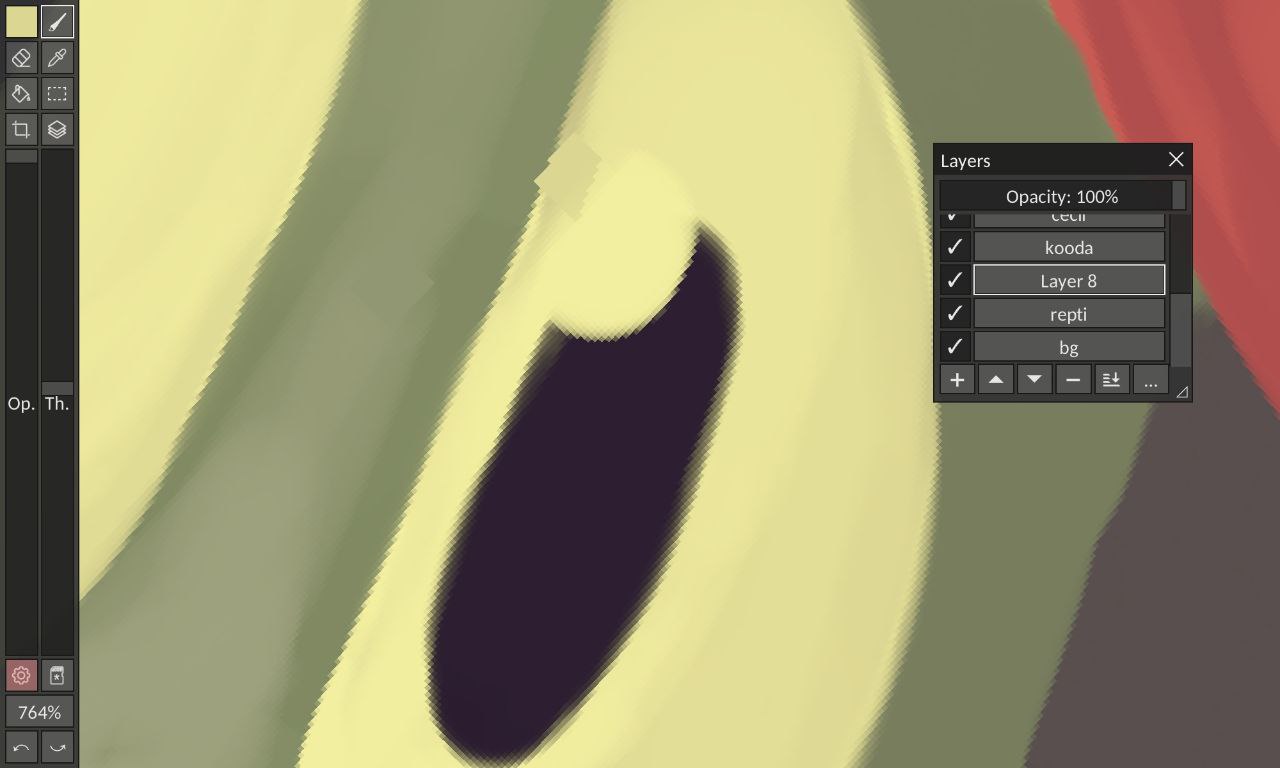
this problem seems to happen only on mobile when using pipette between brushstrokes